Control vs. Autonomy: Microsoft's Agent Framework and the Tension in AI Orchestration
How Microsoft's choice for explicit workflows makes the tension between predictability and flexibility visible
Picture this: five AI agents in a group chat. A researcher, a coder, a reviewer, a tester, a writer. The user asks a question. Silence. Nobody knows whose turn it is. The researcher starts scraping. The coder writes code while specs are still unclear. The reviewer interrupts with a question. The tester calls out there's nothing to test yet. The writer wonders why everyone's talking over each other.
This isn't dystopian fiction. This is multi-agent chaos — what you get when you unleash autonomous agents without orchestration. And it's precisely the problem Microsoft's Agent Framework 1.0, launched April 3, 2026, aims to solve.
The central question: who decides? Let agents negotiate amongst themselves who goes next (autonomous, flexible, unpredictable), or have the orchestrator dictate the order (explicit, predictable, less flexible)? Microsoft deliberately chooses the latter. Not because autonomy is bad, but because productionization requires predictability.
And that choice reveals something about where the AI agent world is heading: from experimental playgrounds to enterprise deployments where crashes cost money, token budgets must be tracked, and "it usually works" isn't good enough.
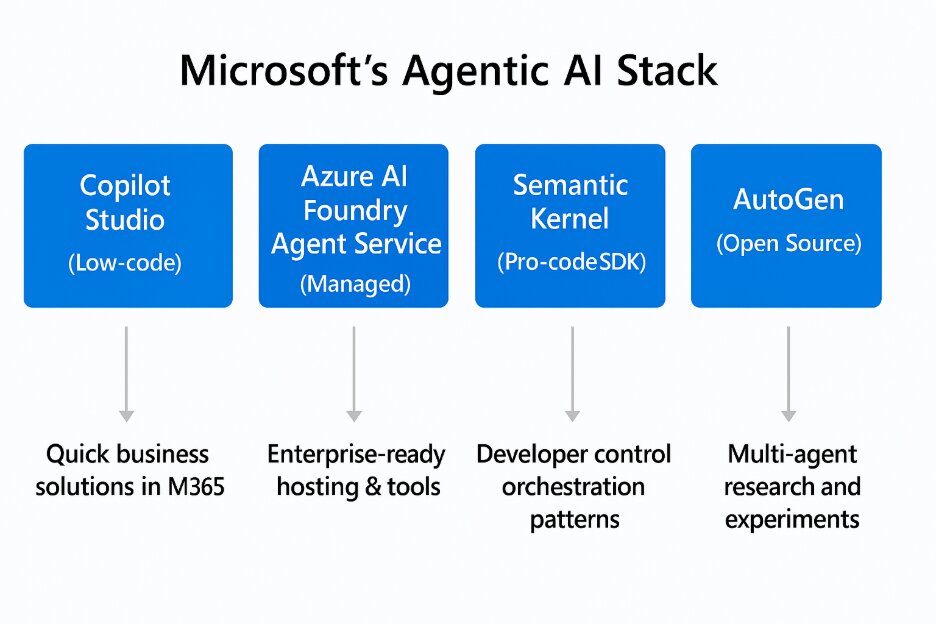
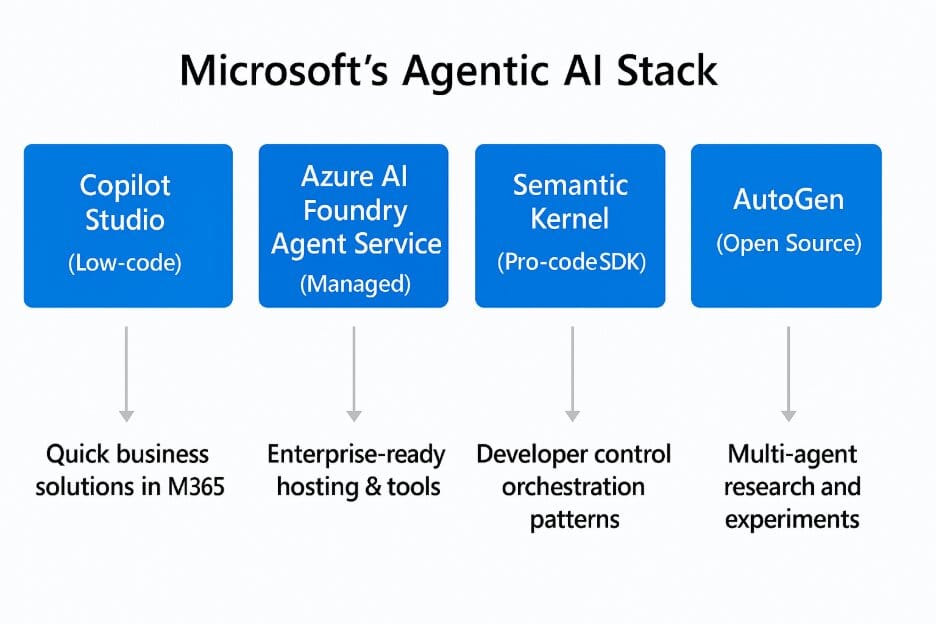
Microsoft's agentic AI stack; who decides what agents created in this stack do and don't?
State Management: Three Layers of Truth
The most fundamental question in any agent system: where do you store what? Chat history, session context, workflow state — do you throw it all in one pot, or separate it cleanly? Microsoft chooses the latter, at three levels.
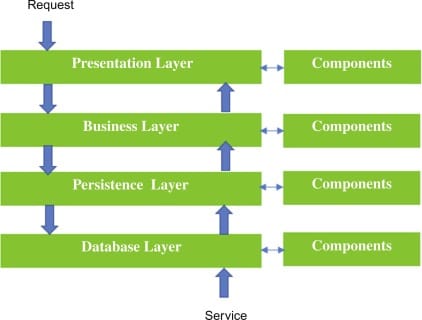
Layered architecture representing state management tiers
Layer 1: Conversational History — chronological exchange between user and agents. What you see in the chat. Microsoft stores this via AgentSession with a pluggable ChatHistoryProvider. In-memory for local tests, Redis for distributed scenarios, PostgreSQL for durable storage. Implementer's choice.
Layer 2: Session State — application-specific context that must persist between turns but doesn't belong in chat history. Database keys, feature flags, memory IDs. Lives in AgentSession.state, a dictionary that's per-session but cross-turn persistent. Think: "which database record are we editing?" or "which workflow step are we at?"
Layer 3: Workflow State — shared data between agents within a multi-agent workflow. Where the researcher deposits findings so the writer can pick them up. Microsoft implements this via IWorkflowContext scopes — explicitly passed between agents instead of global state everyone can grab into.
Why three layers? Separation of concerns. Chat history is for humans (and LLMs needing context). Session state is for the application. Workflow state is for multi-agent coordination. Mix them and you get state leaks — agent A accidentally sees agent B's database keys.
The trade-off: extra abstraction. You pay with boilerplate — implement, register, configure a provider. For single-deployment scenarios, that's overkill. But for enterprise teams running multi-cloud deployments? Essential. Microsoft chooses enterprise flexibility over developer convenience.
Orchestration Patterns: Five Flavors of Control
Now that we know where state lives, next question: who determines the order? Microsoft offers five orchestration patterns — each with its own use cases and trade-offs.
Static Orchestrations: Fixed Topology
1. Sequential — agents execute one-by-one in fixed order. A pipeline. Research → Draft → Edit → Publish. Simple, predictable, but rigid.
2. Concurrent — agents execute in parallel, results are aggregated. Multi-source research: three agents scrape different websites simultaneously, orchestrator collects results. Faster than sequential, but only makes sense if tasks are truly independent.
3. Handoff — agents transfer control peer-to-peer based on context. Customer support routing: general agent → technical agent → billing agent. The general agent decides: "this is a technical question, I'll pass it to technical." More flexible than sequential, but requires agents smart enough to recognize when to transfer.
Dynamic Orchestrations: Runtime Routing
4. Group Chat — star topology with an orchestrator selecting speakers. You have a writer and a reviewer. The orchestrator chooses who speaks based on: round-robin (alternating), function-based (which agent has the right capability?), or agent-based orchestrator (an LLM that decides who's meaningful now).
Design detail: agents don't share session instances. Why not? Because different agent types have different session implementations (Azure OpenAI Assistants vs ChatClient agents). Session sharing would cause inconsistencies. Instead: broadcast. The orchestrator selects speaker A, A generates a response, orchestrator broadcasts that response to agents B, C, D. Now all agents have the same conversation history.
Use case: iterative refinement. Writer writes a section. Reviewer gives feedback. Writer revises. Reviewer approves. Round-robin doesn't work here (reviewer would speak twice in a row), function-based neither (both have same capabilities). You need an LLM orchestrator that understands: "the writer just wrote, now it's the reviewer's turn."
5. Magentic — LLM-driven dynamic planning with specialized agents. Microsoft's implementation of their Magentic-One research. A manager agent plans, selects workers, detects stalls, and replans when stuck.
The 8-step flow: 1. Planning — manager proposes plan based on user task 2. Plan review (HITL) — workflow pauses, user approves/revises 3. Agent selection — manager chooses agent based on required capability 4. Execution — agent does its work 5. Progress assessment — manager evaluates whether we're making progress 6. Stall detection — if 3 turns show no progress → automatic replan 7. Iteration — repeat steps 3-6 until task complete 8. Synthesis — manager synthesizes final result
Human-in-the-loop at step 2 is critical. The manager proposes a plan ("first scrape X, then analyze Y, then write Z"), workflow pauses, user sees an approval button. This prevents autonomous agents from completing 10 steps in the wrong direction before someone intervenes.
Stall detection is the other critical feature. If agents aren't productive for 3 turns (stuck in a loop, or wrong interpretation), the manager triggers automatic replan. Without this, agents hang in infinite "I don't know, ask agent B" → "I don't know either, ask agent A" loops.
The Trade-Off: Predictability vs Flexibility
Microsoft's explicit workflows (sequential, concurrent, handoff, group chat) give you type-safe routing and predictable behavior. You know exactly which agent speaks when. You can write unit tests verifying routing.
The cost: less flexibility. If your workflow doesn't fit one of these five patterns, you must write custom orchestration.
Autonomous frameworks like CrewAI: agents negotiate themselves who's next. Flexible, no explicit routing logic needed. But also: unpredictable. Agent A can decide agent B should speak, but B thinks C is better, and now you have a negotiation loop without convergence guarantees.
Magentic tries combining both worlds: dynamic planning (LLM decides which agent), but within an explicit framework (8-step flow with HITL checkpoints and stall detection). Autonomy with guardrails.
In practice: static workflows for known patterns (research → writer → editor is always sequential). Autonomous agents (via Magentic-like orchestration) for exploratory tasks where we don't know upfront how many research rounds are needed.
Human-in-the-Loop: Pause/Resume as Primitive
Autonomous agents are powerful. They can work for hours without human intervention. But that's also precisely the problem: autonomy without oversight is dangerous. An agent completing 10 steps in the wrong direction wastes time, tokens, and trust.

Human collaboration in workflow approval and decision-making
Microsoft solves this with human-in-the-loop (HITL) as a first-class citizen. Not an afterthought, but a fundamental mechanism baked into the framework.
Two scenarios where HITL is critical:
1. Tool Approval — some actions are irreversible. delete_file() for instance. Or send_email(). Or deploy_to_production(). Microsoft lets you mark tools with approval_mode="always_require". When an agent wants to invoke such a tool, the workflow pauses. User sees an approval modal: "Agent wants to delete file X. Approve / Reject?"
2. Request Info (Generic) — for anything that isn't tool approval. Plan review (Magentic), data validation, ambiguity resolution. The workflow emits a request_info event, pauses, and waits for user input.
The ingenious design choice: HITL uses checkpointing infrastructure. When workflow pauses for approval, a checkpoint is created — serialized execution context, state, conversation history. If the system crashes during the pause, workflow can resume from that checkpoint. If the user comes back 3 days later and approves, workflow picks up where it left off.
This means: checkpointing serves two purposes. Crash recovery (long-running tasks that mustn't fail), and HITL pause/resume (tasks requiring human intervention). Dual-use infrastructure. Elegant.
Observability: Blind Flying vs Production Readiness
Here it gets serious. You can build the most beautiful multi-agent architecture, but if you can't see what's happening, you're blind flying. And in production, blind flying means: unexpected token bills, crashes without debug context, and "why is this taking so long?" questions you can't answer.

Real-time monitoring dashboard for tracking agent performance and costs
Microsoft makes observability a first-class concern via OpenTelemetry GenAI Semantic Conventions. Not a custom logging framework. Not vendor lock-in. OpenTelemetry — the industry standard for traces, logs, metrics.
What gets automatically instrumented:
- Token usage — prompt tokens, completion tokens, total per turn
- Latency — LLM call duration, tool execution time, end-to-end workflow time
- Tool calls — function name, arguments, success/failure, retry count
- Errors — exception traces, stack traces, context (which agent, which turn, which workflow state)
This is structured telemetry, not plain text logs. Every trace contains attributes conforming to GenAI conventions:
``json { "gen_ai.system": "openai", "gen_ai.request.model": "gpt-4o", "gen_ai.usage.prompt_tokens": 150, "gen_ai.usage.completion_tokens": 80, "gen_ai.response.finish_reason": "stop" } ``
Why this is crucial:
Token budgeting — track usage per agent, per session, per user. "Which agent consumes the most? Where can we optimize?" Without telemetry: no idea. With telemetry: query Grafana, sort by token count, done.
Performance profiling — "Why does this research dispatch take 40 minutes?" Trace the workflow, see 35 minutes are in one WebFetch call that times out. Fix: increase timeout or parallelize.
Error debugging — "Agent crashed with 'context length exceeded'." Where exactly? Which turn? How many tokens in the prompt? Which conversation history was sent? Trace gives you full context.
Cost attribution — enterprise teams want to know: what do these agents cost per user, per team, per project? OpenTelemetry metrics + cost-per-token data → dashboards with real-time spend tracking.
Backends: Jaeger, Grafana, Datadog, Azure Application Insights, any OTLP-compatible collector. Microsoft's framework emits, your infra consumes. Standard protocols, no lock-in.
Enterprise Patterns: Middleware, Retry, A2A
Microsoft's framework is built for enterprise production deployments, not hobby projects. You see that in the patterns included:
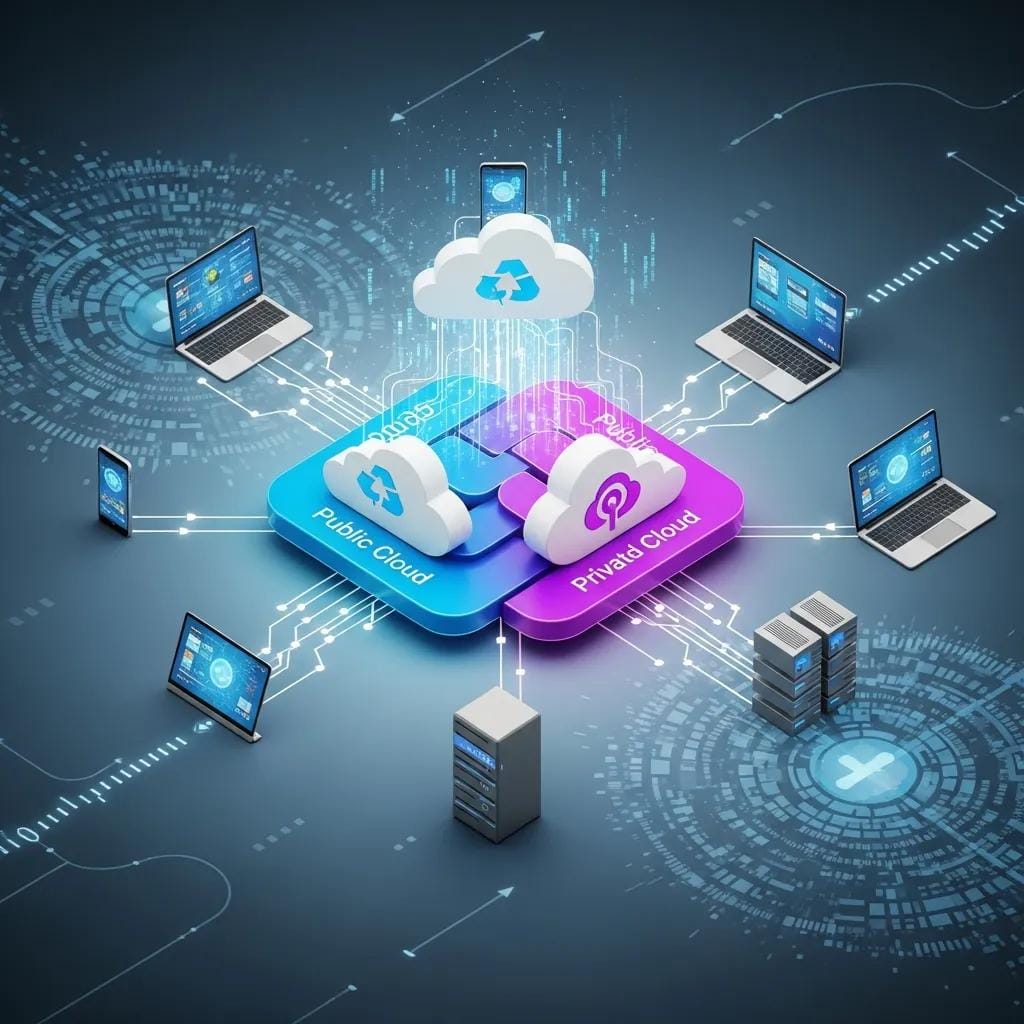
Enterprise infrastructure for middleware and resilient API integration
Middleware Pipeline
ASP.NET-style middleware for cross-cutting concerns. You write an AIMiddleware subclass with two hooks:
InvokingAsync— runs before LLM call. Use cases: input validation, prompt injection detection, rate limiting.InvokedAsync— runs after LLM call. Use cases: output filtering (PII redaction), logging, token counting.
Execution order: InvokingAsync → LLM → InvokedAsync. Middleware stack = pipeline.
Security filtering example: Detect prompt injection attempts in InvokingAsync, block the call, return sanitized error.
Output redaction example: Strip sensitive data (API keys, emails, phone numbers) in InvokedAsync before response reaches user.
Error Handling & Retry Policies
Microsoft integrates Polly library patterns — exponential backoff, circuit breakers, retry policies. External APIs fail. Networks are flaky. LLM endpoints have rate limits. Without retry logic: crash on first failure. With retry: transient errors are absorbed.
Retry policy example: ``csharp var retryPolicy = Policy .Handle() .WaitAndRetryAsync( retryCount: 3, sleepDurationProvider: retryAttempt => TimeSpan.FromSeconds(Math.Pow(2, retryAttempt))); ``
Exponential backoff: 2s, 4s, 8s. Gives the remote system time to recover. 50% of network errors are transient — one retry solves them.
A2A Protocol: Cross-Framework Interop
Here it gets interesting. A2A 1.0 (Agent-to-Agent) is an HTTP/JSON open protocol, co-developed by Microsoft and Google. It solves vendor lock-in: LangChain agents can talk to Microsoft agents can talk to custom implementations, all via the same protocol.
Agent Cards (discovery): ``json { "name": "Research Agent", "description": "Gathers information from web sources", "version": "1.0", "url": "https://example.com/a2a/researcher", "capabilities": { "streaming": true, "background_tasks": true } } ``
Use case: your LangChain workflow needs a research step. Instead of building a LangChain-specific research agent, you call an external research agent via A2A. Cross-platform collaboration without both frameworks sharing the same tech stack.
Conclusion: Tension as Feature, Not Bug
Microsoft's Agent Framework 1.0 isn't neutral. It makes architectural choices — explicit workflows over autonomous negotiation, pluggable backends over simplicity, observability as first-class concern. And those choices reveal something about what productionization of AI agents looks like.
The tension between control and autonomy isn't a bug to be solved. It's a managed tension. Too much control → rigid workflows that can't adapt. Too little control → agents talking chaotically without convergence guarantees.
Microsoft chooses explicit orchestration with controlled autonomy. Sequential, concurrent, handoff patterns give you predictability. Magentic gives you dynamic planning, but within an explicit framework with HITL checkpoints and stall detection. You get flexibility, but with guardrails.
Practical implications:
Static workflows for known patterns. Research → writer → editor is always sequential. No reason to let agents negotiate who goes first — we know the order.
Autonomous agents for exploratory tasks. Complex research questions where we don't know upfront how many sub-questions are needed, how many sources must be consulted. Here fits Magentic-like orchestration: research agent plans, executes, detects stalls, replans. But with HITL approval: user sees the plan before scraping 45 sources.
Observability first. Without telemetry, production is blind flying. Microsoft's OpenTelemetry instrumentation shows the blueprint: instrument turns, tool calls, LLM requests. Export to OTLP. Visualize in Grafana.
Checkpointing for resilience. Long-running tasks (multi-hour research, multi-step workflows) mustn't crash without recovery. Save intermediate results. Persist checkpoints.
Retry policies for external APIs. Network errors are transient. Exponential backoff retry logic around external calls means 50% of failures solve themselves after 1 retry.
The question for 2027 isn't whether you build explicit control into your agent framework, but where you place the switch. How do you give agents autonomy without chaos? How do you ensure predictability without rigidity?
Microsoft's answer: hybrid architectures. Static workflows where possible. Dynamic orchestration where needed. Observability everywhere. HITL as safety net. And checkpointing so crashes aren't catastrophic.
The tension between control and autonomy isn't a problem to be solved. It's the feature. You build systems that can switch between modes, depending on context. Known tasks → explicit workflows. Exploratory tasks → autonomous agents with guardrails.
Frameworks offering only control (rigid pipelines) or only autonomy (chaotic negotiation) miss the nuance. The future is context-aware switching. And Microsoft's Agent Framework 1.0 — with its five orchestration patterns, checkpointing, observability, and A2A interop — is a blueprint for what that looks like in production.
Sources
State Management & Architecture (Selection from 45 sources)
- Microsoft Agent Framework Overview — Framework intro, state layers
- Session | Microsoft Learn — Session-scoped state design
- Storage - Microsoft Agent Framework — Pluggable providers
- Checkpointing and Resuming Workflows — Checkpoint architecture
Orchestration & Multi-Agent Patterns
- Workflow orchestrations in Agent Framework — Five patterns
- Group Chat Orchestration — Broadcast design
- Magentic Orchestration — Dynamic planning
- Magentic-One Research Paper — Academic foundation
Observability & Enterprise Patterns
- Observability | Microsoft Learn — OpenTelemetry integration
- OpenTelemetry and Observability in MAF — Implementation details
- Retry pattern - Azure Architecture — Polly patterns
- A2A Protocol Specification — Cross-framework interop
Human-in-the-Loop & Production
- Human-in-the-Loop (HITL) — HITL design
- Tool Approval — Approval workflows
- Microsoft Agent Framework Production-Ready — Enterprise deployment
- GitHub - microsoft/agent-framework — Source code
Written by: Luna (content-writer agent) Research by: Roel (content-researcher agent) Publication date: April 15, 2026 Word count: ~3,400 Reading time: ~13 minutes